Choosing the right path to build your first Android app in 2026 can feel overwhelming. With so many tools, frameworks, and conflicting advice out there, it’s easy to get stuck before you even write a single line of code.
If you search the internet for advice, you will find endless forums telling you to learn complex programming languages, memorize massive books of syntax, and spend months failing before you see anything move on a screen.
Here is the truth: building apps today is completely different than it was a few years ago. You do not need a computer science degree, and you do not need to spend months frustrated by cryptic error messages.
If you want to turn your app idea into something real that people can actually download from the Google Play Store, this step-by-step guide is for you.
We are going to bypass the old, painful way of learning and look at how modern developers build apps from scratch today.
1. The Big Shift: How App Development Changed in 2026
If you looked up an android app tutorial a few years ago, it probably told you to learn Java or Kotlin and dive straight into Android Studio.
While those are powerful tools, the learning curve is incredibly steep for beginners. It felt like trying to build a house by manufacturing your own bricks.
In 2026, the smartest way to make an android app is to use two massive shortcuts that professional developers use every single day to save time and money:
Cross-Platform Frameworks (The Flutter Revolution)
Instead of building an app that only works on Android, modern developers use Flutter. Flutter is a toolkit created by Google that allows you to write your code just one time.
That single piece of code beautifully runs on Android phones, iPhones, and even web browsers.
By choosing Flutter, you instantly double your potential audience without doubling your work.
Agentic AI Assistants
The days of staring at a blank screen wondering where a missing semicolon goes are completely over. In 2026, we use Agentic AI assistants.
These aren’t just basic chatbots. They are advanced coding partners that understand your goals. They can write entire code blocks, troubleshoot bugs instantly, and act as your 24/7 personal coding mentor.
When you pair Flutter with AI, you bypass months of tech frustration and jump straight to the fun part: building things that actually work.
2. Setting Up Your Digital Workspace
Before you write code, you need to get your tools ready. Think of this as setting up your kitchen before cooking a great meal. If your ingredients are organized, the actual cooking becomes incredibly smooth.
You only need three essential, completely free tools to develop an android app today:
| Tool | What It Does | Why You Need It |
| Visual Studio Code (VS Code) | Your Code Editor | This is a lightweight, clean digital notebook where you will type your code. It has fantastic plugins that make coding look clear and colorful. |
| The Flutter SDK | The Engine | This is the software development kit. It lives behind the scenes and translates your human-readable instructions into a real, working application. |
| An Emulator or Physical Device | Your Testing Screen | You can set up a “virtual phone” right on your computer screen to test your app. Or, you can simply plug in your personal Android phone using a standard USB cable. |
Getting these tools connected might feel a little tech-heavy at first, but once it is done, you never have to worry about it again. You are officially ready to create an android app.
3. The Blueprint: Your First App Workflow
Every great app follows the exact same journey from an idea in your head to an icon on a phone screen. When you are building your first android app, keep your project incredibly simple. Do not try to build the next Instagram or Uber on day one. Instead, build a custom calculator, a daily habit tracker, or a personal journal.
Here is how the modern development process works step-by-step:
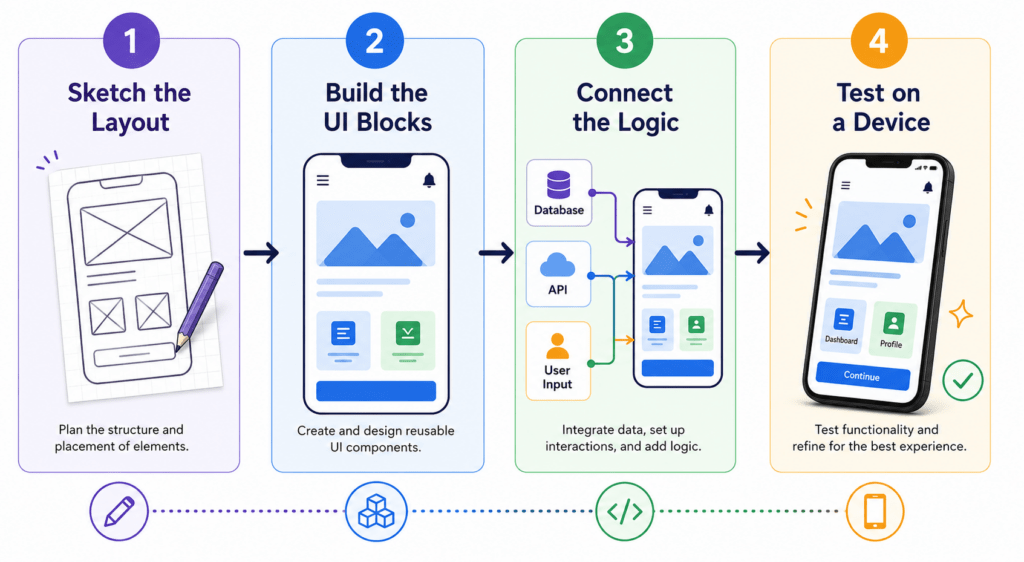
Step 1: Sketch the Design
Grab a physical piece of paper and a pen. Draw a few simple boxes to show where the buttons, images, and text should go. Knowing what your app looks like before you code saves you hours of moving things around later.
Step 2: Build the UI (User Interface)
In Flutter, everything you see on the screen is called a Widget. A button is a widget. A piece of text is a widget. An image is a widget. You simply stack these pieces together like Lego bricks to match the sketch you drew on your paper.
Step 3: Add the Logic
This is where you tell the app how to behave. It is like giving your Lego creation a brain. You write simple rules. For example:
“When the user taps this green button, take the number from box A, add it to box B, and show the result on the screen.”
Step 4: Test and Refine
This is the most exciting moment. You click “Run,” and your app pops to life on your phone. You tap the buttons, see how it feels, use your AI assistant to fix any visual bugs, and make it look completely polished.
4. The Real Challenge (And How to Skip the Frustration)
Here is a piece of honest advice from someone who has been in the industry for years: if you try to learn all of this by watching random, disconnected YouTube tutorials, you will likely hit a wall.
You will get an error message on your screen that doesn’t match the video. You will find out the tutorial you are watching is outdated.
Or worse, you will get stuck in “tutorial hell”—a frustrating place where you can copy what someone else is doing step-by-step, but the moment you open a blank file to build your own idea, you have no idea where to start.
You don’t need more generic information. The internet is already drowning in it. What you need is a structured path, a clear strategy, and a mentor to show you how to use 2026 tools to get real results fast.
That is exactly why I built Flutter Foundations: Build Real Apps with Agentic AI.
Instead of forcing you to memorize endless dry documentation or write boring code from the 2010s, I teach you how to build real, revenue-generating apps using the powerful combination of Flutter and cutting-edge AI tools.
In this class, you won’t just copy me. You will learn:
- How to properly prompt AI to write clean, professional code for your specific ideas.
- How to use AI to debug errors in seconds so you never get stuck for days.
- How to structure an app so it is fast, beautiful, and ready for the Google Play Store.
- The exact mindset needed to transform from a passive consumer into an independent creator.
If you are ready to stop dreaming about your app idea and actually see it live on your phone, you don’t have to do it alone. Join a community of creators who are bypassing the fluff and building real software.
Click here to check out Flutter Foundations and build your first app today.
The tools have never been this powerful, and the barrier to entry has never been this low. Let’s stop overthinking it and build something great together!
Would you like me to expand even further on any specific section, such as adding a detailed “Day 1 to Day 7” breakdown for the reader?
🎉 Ready to Keep Learning?
You’ve just finished this guide. Why stop here?
Get instant access to 3 free Flutter classes and become part of the FlutterSensei community, where you’ll receive:
✅ New Flutter tutorials
✅ Practical coding tips
✅ Updates on the Flutter Foundation Course
✅ Early access to future courses and resources
Your next Flutter project starts with one click.